

Document watermarking
Time to complete: 5 minutes
Prerequisites: PDF documents uploaded to your Trust Center; paid plan required for custom watermarks
Watermarking helps you track document distribution and protect sensitive materials. When Trust Center visitors view or download a PDF document (such as a SOC 2 report), Conveyor automatically applies a watermark with the visitor's email address and a timestamp—so you always know who accessed your documents and when.
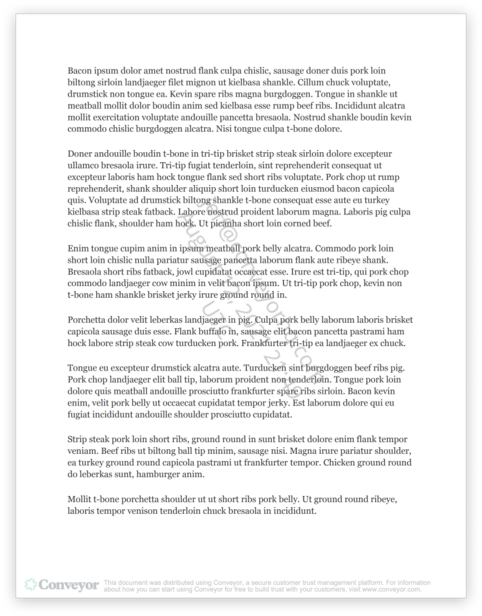
Watermarks display the visitor's email and download timestamp on each page.
Watermark Options by Plan
Free accounts – Documents include the visitor's email, timestamp, and a Conveyor watermark. To remove the Conveyor branding, contact [email protected].
Paid accounts – You can customize your watermark text and styling. Contact your customer success rep or email [email protected] to request a custom watermark.
Customization Options
Custom watermarks can include:
- Default text – Visitor email and download date (automatically applied)
- Custom text – Your own text, such as "[Company] Confidential"
You can also customize:
- Angle
- Font size and color
- Opacity
- Height and width percentage
Note: Custom variables (such as CRM fields) are not currently supported.
Disabling Watermarks
You can disable watermarking at two levels:
Per document – When editing a document's sharing settings, check Disable watermarking for this document in the Additional Options section. This prevents watermarks from being applied to that specific PDF.
Note that this setting must be configured on each document individually — bulk disabling watermarks across multiple documents is not currently supported.
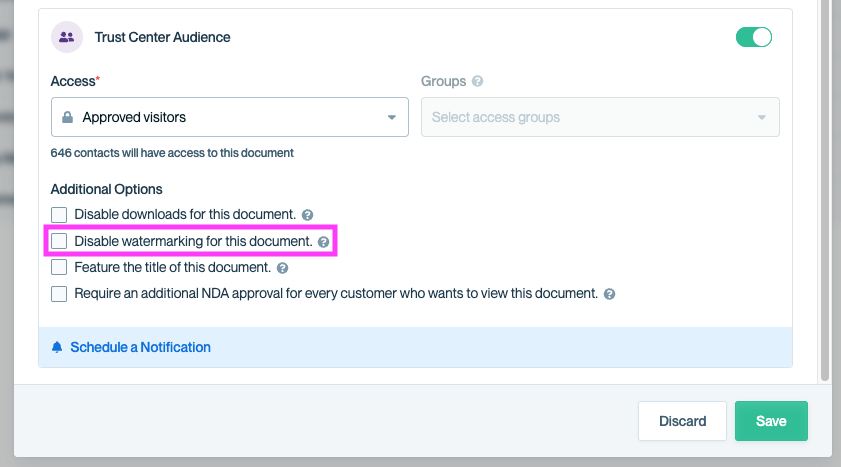
Check 'Disable watermarking for this document' in the Additional Options section of your document's sharing settings.
Organization-wide – Watermarking can also be disabled across all documents at the organization level. To request this, contact your customer success rep or email [email protected].
Common Questions
Which file types support watermarking?
Watermarking is applied to PDF documents only. Other file types (Word, Excel, etc.) are not watermarked.
We do not support watermarking on PDF documents that are protected with a password. You will still be able to view and download these documents, but watermarks will not be applied.
Does the watermark appear when visitors preview documents in the browser?
Yes. Watermarks are applied both when viewing in the browser and when downloading.
Can I see who downloaded a watermarked document?
Yes. View the document's Activity & Versions page to see a log of all interactions, including the visitor's email and timestamp.
Are accessibility tags preserved when downloading watermarked documents?
We do not preserve accessibility tags when downloading watermarked documents.
What's Next
- Document Access – Control who can view and download your documents
- Editing documents – Update document settings
Need help? Visit the Troubleshooting guide or contact [email protected]
Updated 6 months ago