

Q&A curators
Time to complete: 5-10 minutes
Prerequisites: Curated Q&As created in your Knowledge Library
Assign curators to your Curated Q&As to establish ownership and ensure answers stay current. Curators are team members responsible for maintaining specific Q&As and receive automatic notifications when verification periods expire, helping you keep your most important content accurate without manual tracking.
Assign a curator to individual Q&As
Set ownership and verification schedules for specific questions:
- Navigate to Knowledge Base → Curated Q&As
- Click on a question to open it
- Select a team member from the Curator dropdown
- Set the Verify within period (never, monthly, quarterly, semi-annually, or annually)
- Click Save
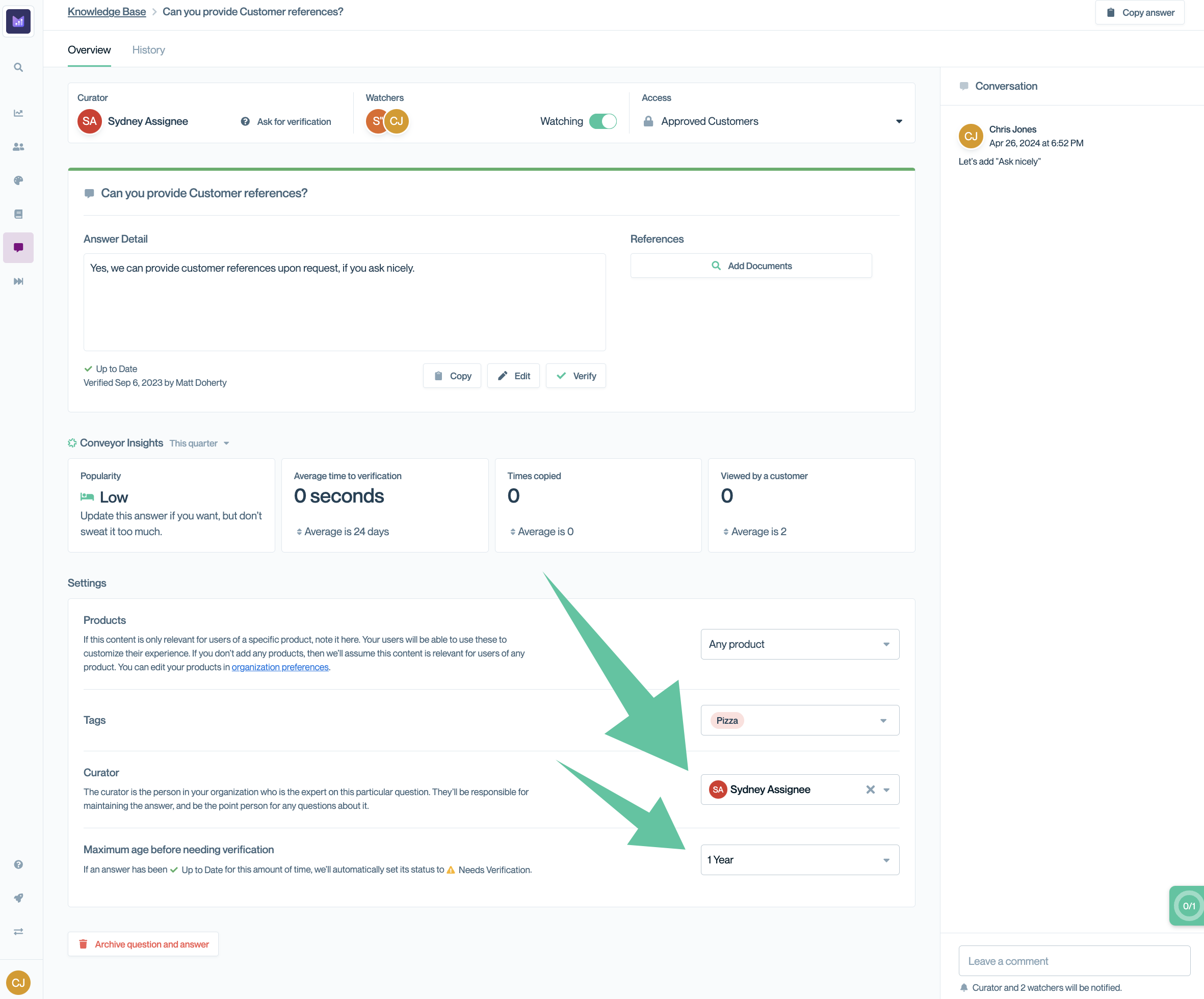
Assign a curator and set verification period for individual Q&As.
Choosing verification periods
Match verification frequency to how often information changes:
- Quarterly: Rapidly evolving topics like product features, compliance requirements, or pricing
- Semi-annually or Annually: Moderate-change topics like policies, security practices, or organizational structure
- Never: Stable information like company founding date, core mission, or historical facts
💡 Tip: Err on the side of more frequent verification for customer-facing Q&As shared in your Trust Center. Internal-only Q&As can use longer cycles.
Bulk-assign curators
Update multiple Q&As at once to quickly establish ownership. Bulk editing is particularly useful when:
- Assigning all security-related Q&As to your security team lead
- Distributing Q&As by product line to respective product managers
- Reassigning Q&As when team members change roles
See Bulk actions for Q&As for more details.
How curator notifications work
Curators receive automatic reminders when verification periods expire:
- Email notifications alert curators that specific Q&As need review
- Notifications include direct links to the Q&As requiring attention
- Curators can review, update, and reset the verification period in one workflow
You can also filter to see Q&As needing verification:
- Navigate to Knowledge Base → Curated Q&As
- Click Filter
- Select Needs Verification
This view helps curators prioritize their review work and ensures nothing falls through the cracks.
Common questions
Can I assign multiple curators to one Q&A?
No. Each Q&A can have only one curator. If multiple people need to review content, assign the primary owner and use internal comments to collaborate.
What happens if a curator leaves the organization?
Reassign their Q&As to new team members using bulk editing. Use filters to find all Q&As assigned to a specific curator before they depart.
Do curators need special permissions in Conveyor?
No. Any team member with access to the Knowledge Library can be assigned as a curator. They'll receive notifications regardless of their role.
Can I see all Q&As assigned to a specific curator?
Yes. Use the Filter option on the Curated Q&As page and filter by curator name to see their complete list.
What if I don't want verification reminders?
Set the verification period to Never for Q&As that don't require regular review. This is appropriate for stable, unchanging information.
What's next
Need help? Visit the Troubleshooting guide or contact [email protected].
Updated 10 months ago