

Test Environment
Time to complete: 5 minutes
Prerequisites: At least one document uploaded to your Knowledge Library
Introduction
When adding new documents and Curated Q&A's to your Knowledge Library, you may want to evaluate how they perform before using them in live customer questionnaires. Test Environment Access lets you control which documents and Curated Q&A's are available in test questionnaires versus live customer questionnaires, so you can validate document performance without affecting production answers.
This is particularly useful when you're replacing critical documents like SOC 2 reports with updated versions and want to compare how ConveyorAI responds before making the switch.
How It Works
Every document and Curated Q&A in your Knowledge Library has two environment access settings:
- Live environment access: When enabled, ConveyorAI can reference this document when answering customer questionnaires.
- Test environment access: When enabled, ConveyorAI can reference this document when answering test questionnaires (marked as internal tests).
All documents and Curated Q&A's have both environments enabled by default.
You can enable one, both, or neither setting depending on your use case:
| Configuration | Live Questionnaires | Test Questionnaires |
|---|---|---|
| Both enabled | ✓ Uses document and Curated Q&A | ✓ Uses document and Curated Q&A |
| Live only | ✓ Uses document and Curated Q&A | ✗ Does not use |
| Test only | ✗ Does not use | ✓ Uses document and Curated Q&A |
| Neither enabled | ✗ Does not use | ✗ Does not use |
Setting Document Environment Access
When you add or edit a document, you'll see the ConveyorAI Access section under "Share With." This section contains two toggles under Environments:
- Live environment access — "For answering customer questionnaires"
- Test environment access — "For internal testing only"
Toggle each setting on or off based on how you want the document to be used.
By default, new documents have both environments enabled. To restrict a document to test questionnaires only, turn off "Live environment access" while keeping "Test environment access" on.
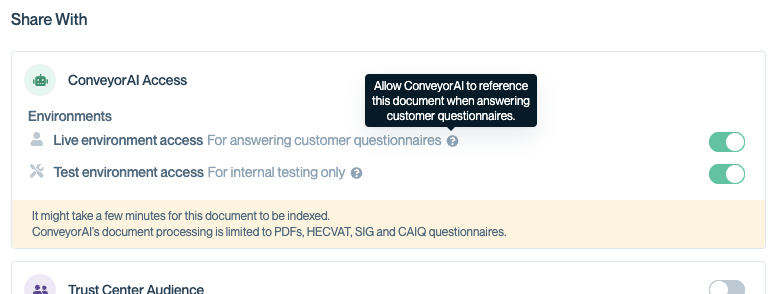
Allow ConveyorAI to access document in Live or Test environments
Viewing Environment Status
In the Knowledge Library, the Shared With column shows each document's environment configuration:
- ConveyorAI — Available in both live and test environments
- ConveyorAI (Live) — Available only in live questionnaires
- ConveyorAI (Test) — Available only in test questionnaires
- Internal only — Not available to ConveyorAI in any environment
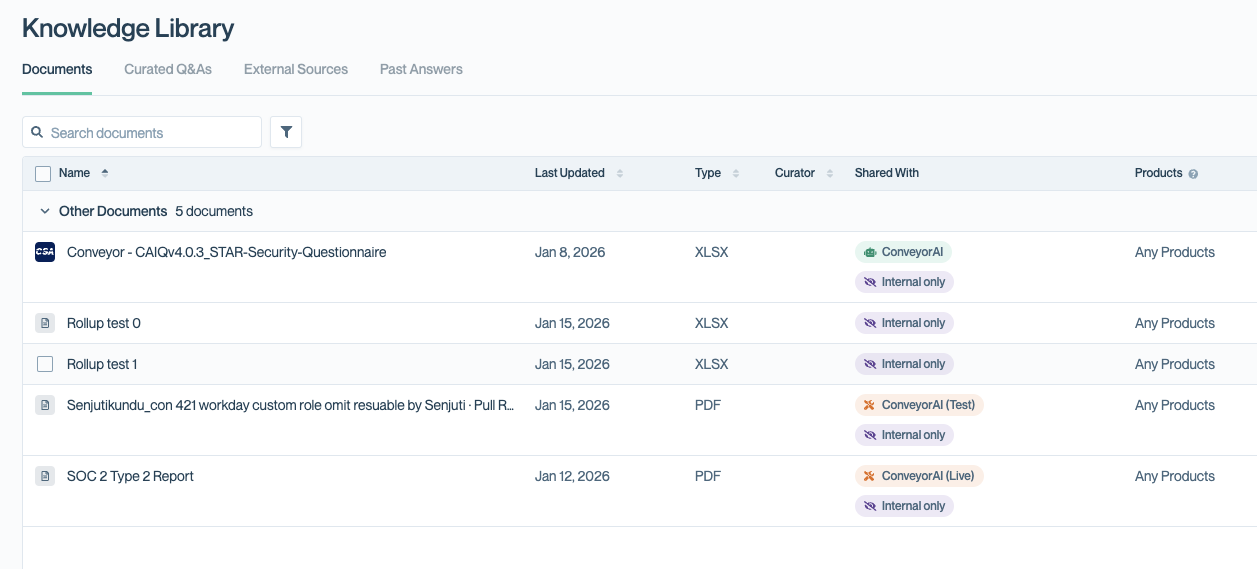
Under "Shared With" column, The ConveyorAI (Test) shows it is only available for tests, and The ConveyorAI (Live) indicates it is not used for testing purposes.
Curated Q&As
When you add or edit a curated Q&A, Knowledge Admins will see a ConveyorAI Environments section in the settings panel. This controls which environments ConveyorAI can use the Q&A in, with two toggles:
- Live environment — Makes this Q&A available for answering customer questionnaires
- Test environment — Makes this Q&A available for internal test questionnaires only
By default, new curated Q&As have both environments enabled. To restrict a Q&A to test questionnaires only, turn off "Live environment" while keeping"Test environment" on. Turning off both toggles disables the Q&A for ConveyorAI entirely.
You can also set environment access when uploading curated Q&As in bulk via CSV. Add a ConveyorAI Environments column with one of these values:
- Always — Available in both live and test (default if column is omitted)
- Test only — Available only in test questionnaires
- Live only — Available only in live questionnaires
- Disabled — Not used by ConveyorAI in any environment
Test Questionnaires
Test questionnaires provide a safe way to validate how ConveyorAI uses your new documents before they go live. When you mark a questionnaire as an internal test, ConveyorAI only references documents with "Test environment access" enabled—your live-only documents won't be used.
Test questionnaires don't consume usage credits, so you can run as many as you need during evaluation. Answers generated in test questionnaires are isolated from your production data: they won't be saved to Past Answers or influence future customer responses.
Creating Test Questionnaires
To run a test questionnaire that uses only test-environment documents:
- Navigate to Questionnaires and click Add Questionnaire.
- Check the box Mark this questionnaire as an internal test.
- Complete the remaining fields and upload your questionnaire.
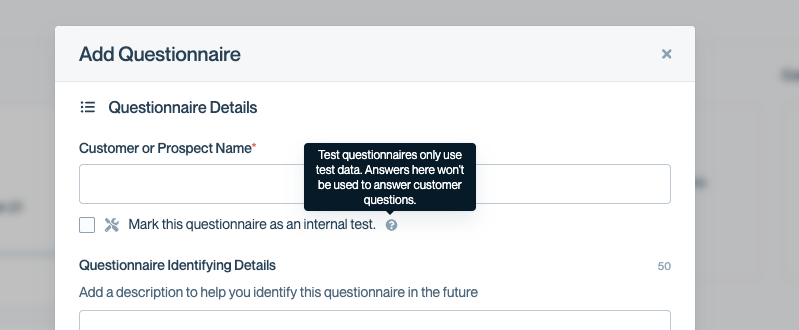
Pick at the beginning of questionnaire creation of it is only for testing.
Example: Testing Updated SOC Reports
A common use case is testing new versions of compliance documents before replacing the current versions. Here's how to set this up:
Scenario: You have a new SOC 2 Type II report and want to test how it performs before replacing your existing report.
- Upload your new SOC 2 report to the Knowledge Library.
- Edit the new document and set:
- Live environment access: Off
- Test environment access: On
- Edit your existing SOC 2 report and set:
- Live environment access: On
- Test environment access: Off
- Create a test questionnaire with sample security questions.
- Review the AI-generated answers to validate the new document performs as expected.
- Once satisfied, swap the environment settings to make the new document live.
This approach lets you compare answers side-by-side without affecting customer questionnaires during the evaluation period.
Common Questions
What happens if I disable both environments for a document?
The document remains in your Knowledge Library but ConveyorAI won't use it to answer any questionnaires. This is useful for archiving documents you want to keep but not actively use.
Can I use test environment access with Curated Q&As?
Currently, environment access settings apply only to documents. Curated Q&As are available in all questionnaires regardless of test status.
Do test questionnaires count against my credits?
No, running test questionnaires for documents do not consume credits.
How do I know which documents a test questionnaire will use?
Test questionnaires use documents with "Test environment access" enabled. Check the "Shared With" column in your Knowledge Library to see which documents show "ConveyorAI (Test)" or "ConveyorAI" (both environments).
Can I convert a test questionnaire to a live questionnaire?
No. The test designation is set when the questionnaire is created and cannot be changed. If you need live answers, create a new questionnaire without the internal test checkbox.
What's Next
Need help? Visit the Troubleshooting guide or contact [email protected].
Updated 6 months ago