

Trust Center SSO
How you can give Trust Center visitors the most seamless experience possible.
Time to complete: 5 minutes
Prerequisites: A custom domain must be set up first.
What is Single Sign-On (SSO)?
Single Sign-On (SSO) provides a seamless login experience for your Trust Center visitors. It allows users to sign in with their own identity provider—such as Okta, Azure AD, Google Workspace, or any SAML/OIDC IdP—without creating a separate account.
For example:
- A user visits your Trust Center at
trust.mediacore.com. - They click Login with SSO.
- They're redirected to authenticate with your organization's identity provider.
- Upon successful authentication, they're automatically granted access to your Trust Center.
With SSO enabled, your customers can access gated content (pending NDA) using credentials they already know, creating a frictionless experience.
How it works
Conveyor provisions a hosted tenant in Deskope, our identity platform. Your customer's IdP admin completes the connection through a setup link you provide. Once configured, employees from that organization can sign in using their work credentials.
Setup steps
-
Request SSO enablement
Contact [email protected] and ask us to enable Single Sign-On for your trust center. -
Share the setup link
Once enabled, you'll be able to setup your provider in Settings > Trsut center > Single Sign-On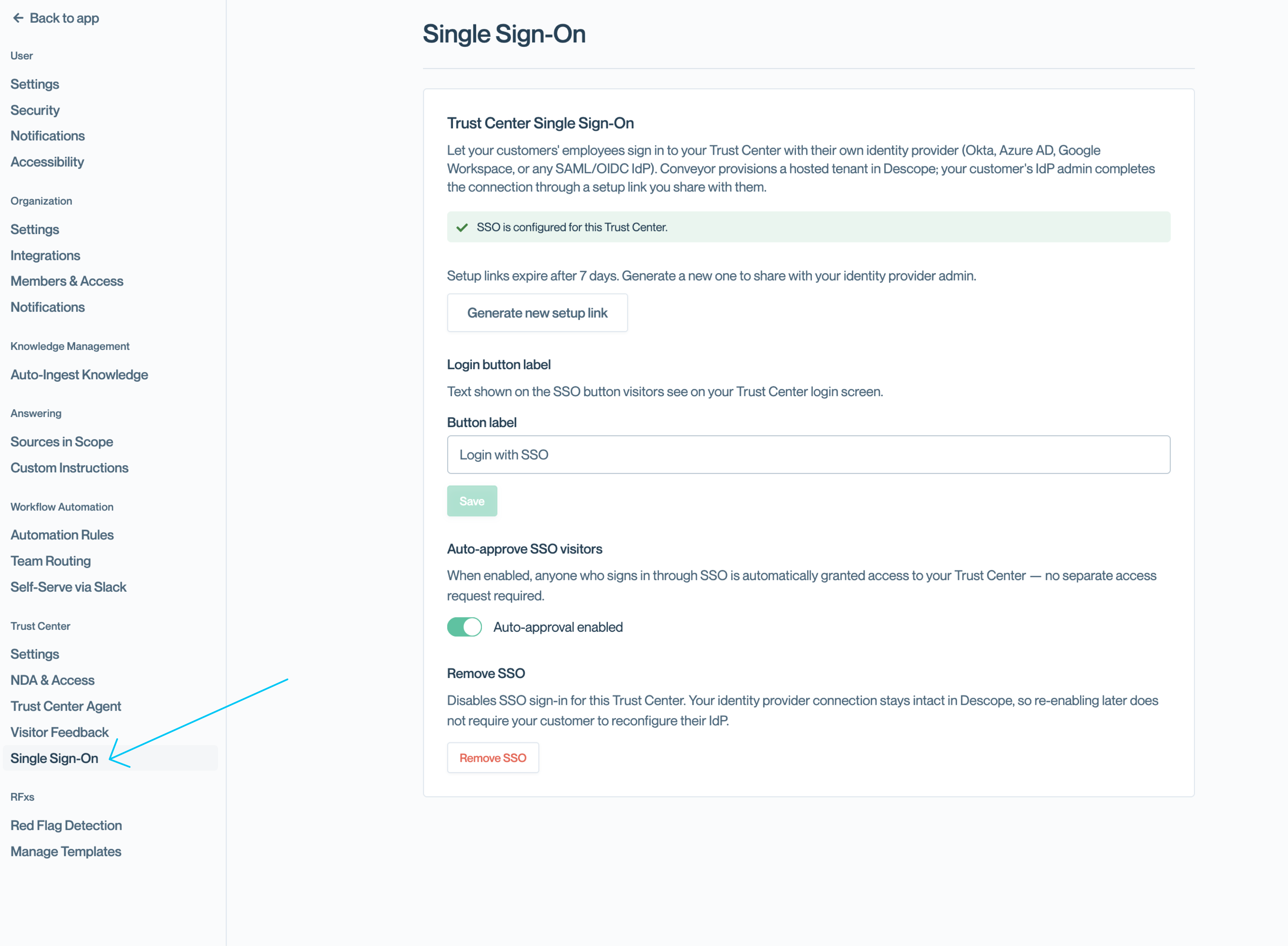
-
Follow provided instruction to setup your povider
-
Customize the login button
In your Trust Center settings under Single Sign-On, customize the button label (e.g., "Login with SSO") that visitors will see on the login screen. -
Enable auto-approval (optional)
Toggle Auto-approve SSO visitors to automatically grant access to anyone who signs in via SSO. When disabled, visitors must still submit an access request.
Configuration options
Login button label
Customize the text shown on the SSO button visitors see on your Trust Center login screen.
Auto-approve SSO visitors
When enabled, anyone who successfully authenticates via SSO is automatically granted access to your Trust Center—no separate access request required.
Remove SSO
Disables SSO sign-in for this Trust Center. Your customer's IdP connection remains intact in Deskope, so re-enabling later doesn't require reconfiguration.
Common questions
Do visitors still need to sign an NDA?
Yes, unless one has already been signed for their organization or you use Salesforce for this.
Can I use SSO for internal employees?
Yes. SSO works for both external customers and internal employees.
What if my customer's IdP isn't Okta, Azure AD, or Google?
Any SAML or OIDC-compatible identity provider is supported.
What's next?
- Setting up a custom domain - Required before enabling SSO
- Bypassing NDA - Skip NDA for trusted contacts
- Auto-approving connection requests - Combine with SSO for a truly seamless experience
Need help? Contact [email protected] for setup guidance.
Updated about 15 hours ago