

Q&A access levels
Time to complete: 5 minutes
Prerequisites: Curated Q&As created in your Knowledge Library
Control who can see your Curated Q&As by setting access levels. Q&As can be shared publicly with all Trust Center visitors, restricted to approved customers only, or kept internal for ConveyorAI's use. Access levels give you granular control over what information customers can self-serve versus what remains internal.
Understanding access levels
Choose from three access levels, from most open to most restricted:
Anyone: Q&As are available on the public view of your Trust Center without requiring access approval or an NDA. Best for general company information, public security posture details, or frequently asked questions.
Approved customers: Q&As require visitors to have access approval and complete the NDA step. Note that questions (not answers) appear as a "sneak peek" if you enable the Question and Answer carousel on the public view. Best for detailed security practices, compliance specifics, or customer-specific information.
Internal Only (Default): Q&As are not visible to any Trust Center visitors. They're available only for internal purposes like ConveyorAI answering questionnaires or team members using Search. Best for sensitive details, internal processes, or content still being refined.
💡 Tip: Internal Only is the default access level when creating new Q&As. You must explicitly change access to share content with customers.
Set access for individual Q&As
Change the access level for a specific Q&A:
From the index view:
- Navigate to Knowledge Base → Curated Q&As
- Click the pencil icon under the Access column
- Select the desired access level
- Click Save
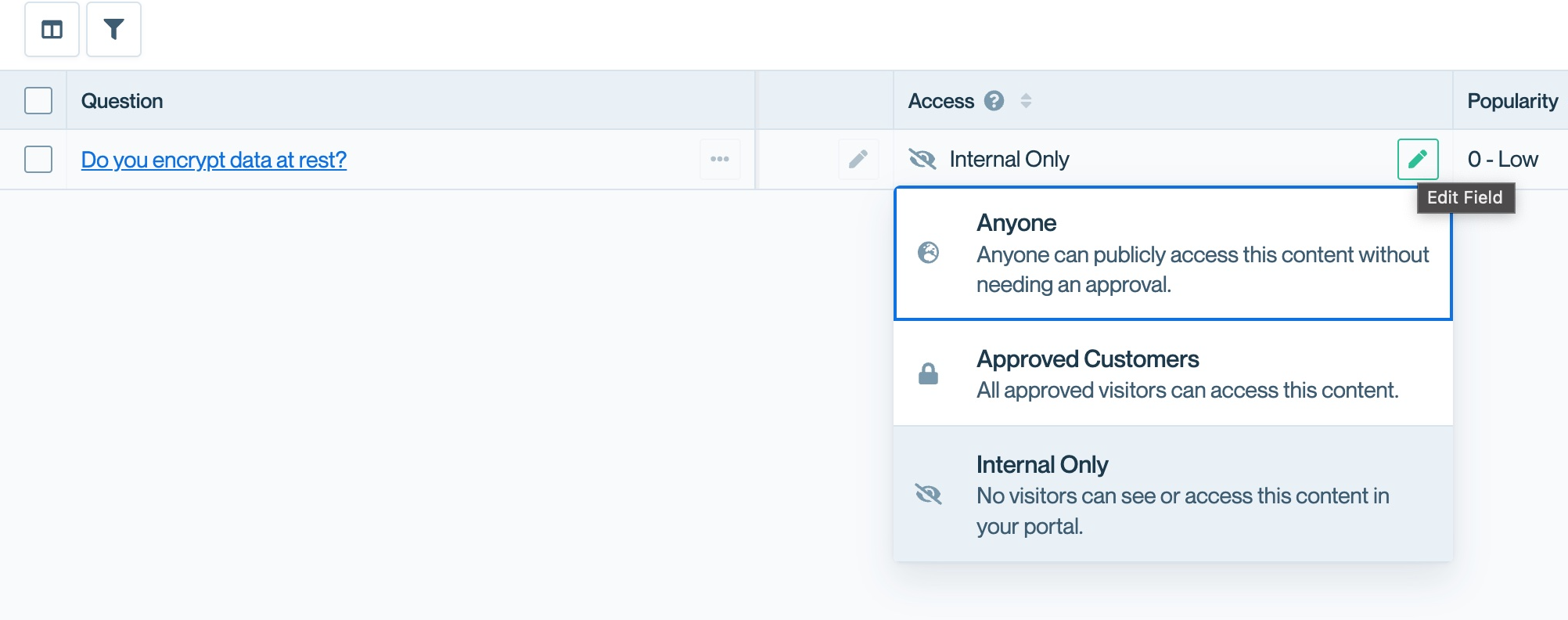
Click the pencil icon in the Access column to change individual Q&A access levels.
From the detail view:
- Click on a Q&A to open it
- Select the desired access level from the Access dropdown
- Click Save
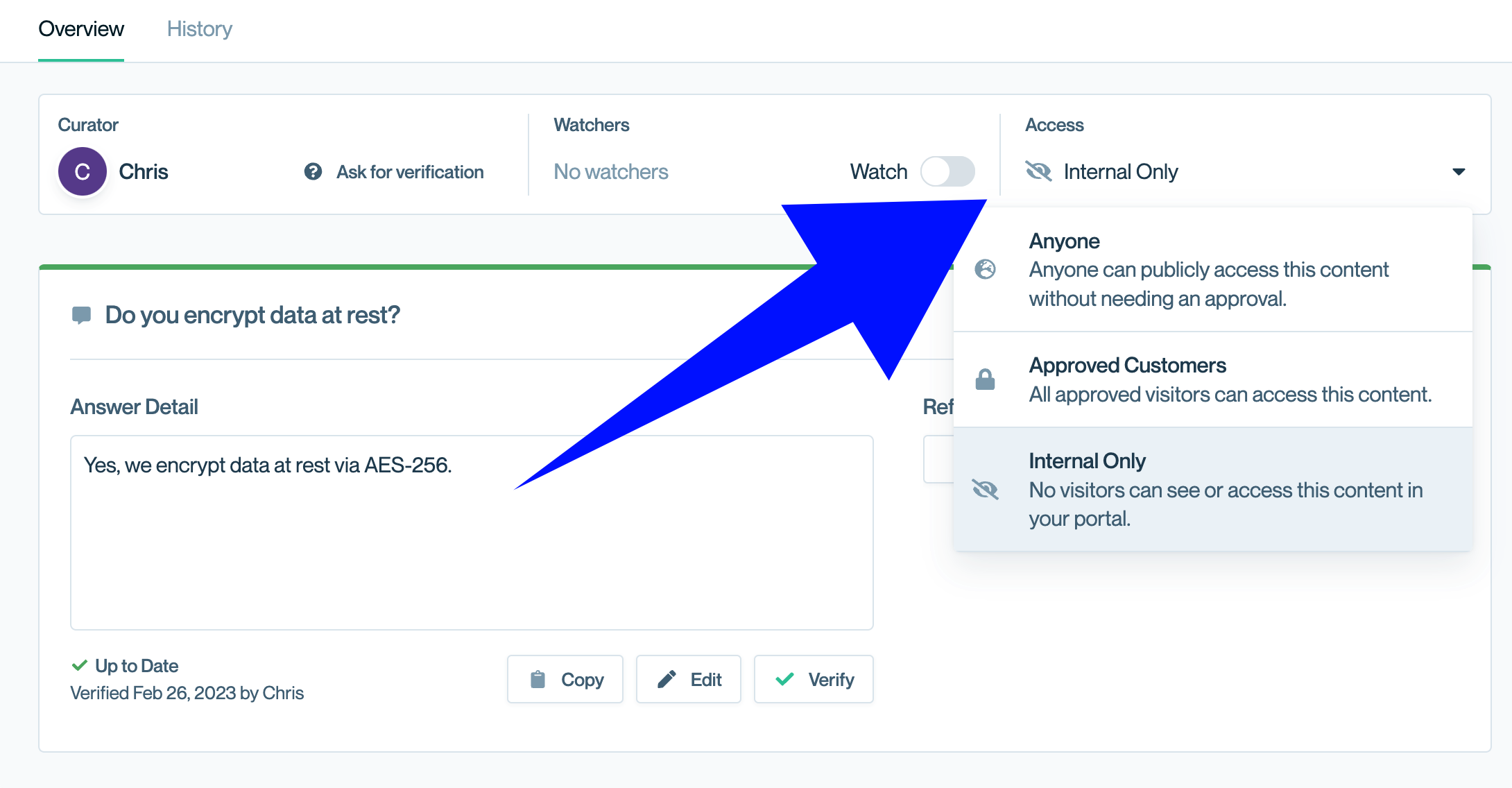
Set access levels from the Q&A detail view.
Bulk-edit access levels
Update multiple Q&As at once to quickly adjust visibility. Bulk editing is particularly useful when:
- Publishing a batch of reviewed Q&As from Internal Only to Anyone
- Restricting previously public Q&As to Approved customers only
- Making seasonal or temporary content internal after a campaign ends
See Bulk actions for Q&As for more details.
Best practices for access levels
Start with Internal Only. Create and refine Q&As for ConveyorAI first, then selectively share polished, customer-friendly content in your Trust Center. Not every Q&A needs to be customer-facing.
Use Anyone sparingly. Reserve public access for information you'd put on your website—general company details, high-level security practices, or marketing-approved messaging.
Leverage Approved customers for competitive advantage. Use this level for detailed security specifics, compliance evidence, or information that helps close deals but shouldn't be publicly searchable.
Review access levels quarterly. As your security posture evolves, previously internal Q&As may become safe to share, or public Q&As may need restriction.
Common questions
What happens to the "sneak peek" questions on the public view?
When you enable the Question and Answer carousel on your Trust Center's public view, questions (not answers) from Approved customers Q&As appear as teasers. Visitors must request access and complete the NDA to see the full answers.
Can I use Access Groups with Q&As?
Not currently. Access Groups work with documents but not with Q&As. Q&As use the three-level system: Anyone, Approved customers, or Internal Only.
If I change a Q&A from Anyone to Internal Only, will it disappear from customer view immediately?
Yes. Access changes take effect immediately. Customers will no longer see the Q&A in your Trust Center.
Can customers search for Internal Only Q&As?
No. Customers can only search and view Q&As they have access to based on their approval status and the Q&A's access level.
What's next
Need help? Visit the Troubleshooting guide or contact [email protected].
Updated 10 months ago