

Questionnaire Support with the Trust Center Agent
Time to complete: 5–10 minutes
Prerequisites: Trust Center must be live; you must be an Organization Owner or Admin.
Overview
The Questionnaire capability extends the Trust Center Agent to help you and your visitors complete security questionnaires faster and with less manual effort. When enabled, the Agent can draft answers to questionnaires and provide linked source citations - all using your approved Trust Center content.
This page explains how questionnaire support works, how to enable it, and what to expect when testing and using it.
What the Questionnaire Capability Does
When questionnaire support is enabled, the Trust Center Agent can:
- Accept uploaded security questionnaires from visitors.
- Handle bulk question queries (multiple questions at once) instead of one-by-one chat interactions.
- Generate draft answers based on published Trust Center documents and knowledge.
- Cite relevant documents and Q&A resources alongside provided answers.
The Agent only uses content the visitor is approved to access, and responses always include citations back to source documents.
Enable Questionnaire Support
Questionnaire support is configured from the Trust Center Designer.
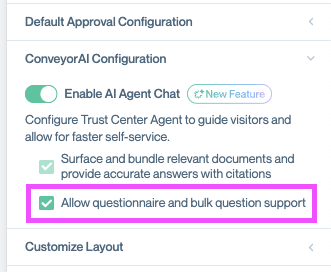
- Navigate to Trust Center → Designer.
- In the right sidebar, expand ConveyorAI Configuration.
- Ensure that Enable AI Agent Chat is toggled on.
- Check Allow questionnaire and bulk question support.
Tip: You can customize the fallback text shown when the Agent can't answer a question in a questionnaire, as well as the file disclaimer text that appears at the top of returned questionnaire files. Navigate to Settings → Trust Center Agent → Agent Configurations to update these. See Enabling the Trust Center Agent for details.
How Visitors Use Questionnaires
Once enabled and published, approved visitors can:
- Click Fill Questionnaire in the Agent interface to learn more from the Agent about how to kick off the questionnaire answering flow.
- Upload a questionnaire file in their preferred format. Accepted file formats are CSV, XLS, PDF, and Doc.
- Paste a bulk list of questions directly into the agent chat interface.
- Download completed questionnaires in a standardized file format.
For a visitor-focused walkthrough, see the Trust Center Agent Visitors Guide.
Testing Questionnaire Support in Preview Mode
You can test questionnaire functionality in preview mode, with a few important limitations.
What Works in Preview
For all user roles and types:
- Asking one-off questions in chat.
- Requesting documents.
Preview Limitation for Questionnaires
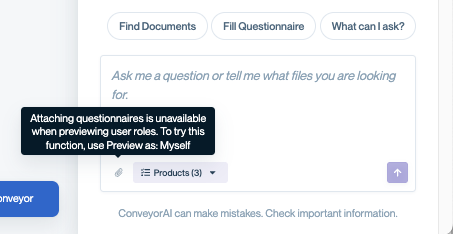
Questionnaire uploads and bulk question answering in preview mode is only supported when previewing as Myself.
When previewing as other user roles, you may see the Fill Questionnaire button disabled or a message indicating that questionnaire answering is unavailable.
This limitation exists because questionnaire context is tied to a specific user identity and cannot be simulated within preview.
Best Practices for Accurate Questionnaire Answers
To get the best results from questionnaire support:
- Keep Trust Center documents up to date and clearly titled.
- Publish only finalized and approved security content.
- Use consistent terminology across policies and reports.
- Share the Visitor's Guide with your customer-facing teams (like Sales and Customer Success) as well as with your customers directly to help them understand the Agent capabilities.
Common Questions
Q: Are questionnaire answers automatically sent to the visitor?
A: Yes, the visitor is notified when the file is done processing and ready for download.
Q: How long does questionnaire processing take?
A: Processing times depend on the length of the file. Users are shown the estimated time remaining for processing their file directly in the chat window. They can continue to interact with the Agent about other requests while the file is processing.
Q: Does the user have to wait on the Trust Center for the file to finish?
A: No the user is free to navigate away from the Trust Center and will receive an email notification letting them know when their request is complete and that they can return to download their file.
Q: Can the Agent answer questions it doesn’t have content for?
A: The Agent will only answer based on available, approved content and an answer is only provided if the agent can provide citations and reference material when answering.
Q: Does the Agent use internal sources or internal questionnaire past answers to answer customer uploaded questionnaires?
A: No, the Questionnaire capability within the Trust Center is similar to the internal Questionnaire processing; however, it will only ever use content that you have approved for visitor use via publishing to your Trust Center. The Agent cannot expose any internal documentation or past answers via the Questionnaire answering tool.
Q: Can I disable questionnaires without turning off the Agent entirely?
A: Yes. You can uncheck Allow questionnaire and bulk question support while leaving the Agent enabled for Q&A and document discovery.
What’s Next
- Add or update documents to improve questionnaire coverage.
- Review visitor-facing guidance in the Trust Center Agent Visitors Guide.
- Monitor feedback from reviewers to identify gaps in content.
Need help? Visit the Troubleshooting guide or contact [email protected].
Updated 7 months ago